Building local AI agents
, filed under llamacpp, agentic AI
Local AI agents are one of the most exciting technologies today. In this blog post I share my experience building a local AI agent.
If you are new to this topic, there is a fantastic course about Agentic AI directly from NVIDIA (I recommend all courses from NVIDIA, great content!)
Prerequisites
In this post I use the following stack:
To speed things up make sure at least Python and pip are running on your machine before reading on.
Get started
Now let’s get started. First, let’s install Google’s brand new Agent Development Kit.
pip install google-adkAfter successfully running this installation, your environment should have the adk command installed.
Let’s use it to scaffold the new python agent environment:
adk create agent_smithThis should create the following output:
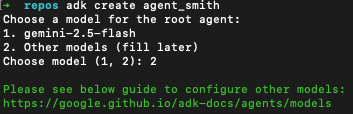
ADK provides the flexibility to choose the model for the root agent. In this sample we choose option 2. Option 1 (gemini-2.5-flash) is the easier choice, but we want to go the extra-mile.
Choosing “Other models” requires us to use a “runtime” for our model. In this sample we use Ollama to run the model.
For this you need to do the following (after installing ollama):
ollama pull nemotron-3-nanoThis might take some time:

Depending on your internet connection, now might be the right time to grab a cup of coffee.
As soon as the download completed you can check with
ollama lsThis should list nemotron-3-nano in the locally available models:
NAME                      ID              SIZE     MODIFIED
nemotron-3-nano:latest    b725f1117407    24 GB    2 minutes ago
Congrats 🎉! You successfully loaded your first model on your machine!
Time to check it out!
Test your local agent
There are many different approaches how you can interact with your local model. Let’s start with a simple python script:
from ollama import chat

response = chat(
    model='nemotron-3-nano',
    messages=[{'role': 'user', 'content': 'Hello!'}],
)
print(response.message.content)
Save this in main.py and run this script with
python main.pyWhen everything works you should see something like this:
Hello! 😊 How can I assist you today? Whether you have questions, need help with something, or just want to chat, feel free to let me know!Wow - your first answer from a local model. Cool! And quite fast (at least on my machine).
Google’s ADK
Up to now we used a very “thin” python-wrapper around Ollama to interfere with the model. Let’s dive a little deeper with Google’s ADK
When working with Google’s ADK you can choose among different “hosting options” of the models you want to interact with. In this blog post I focus on local models as we want to dive deeper.
Running local models - and optimizing them before deploying them to production - requires a lot more work and will be covered in future blog posts. For now we just want to start with the basics.
Let’s recover what we did:
- Installed all required tools
- Downloaded the model of interest (nemotron-3-nano)
So let’s build an AI agent with Google’s ADK.
Edit the agent.py file scaffolded previously in the agent_smith-directory:
from google.adk.agents import LlmAgent
from google.adk.models.lite_llm import LiteLlm

root_agent = LlmAgent(
    model=LiteLlm(model="ollama_chat/ministral-3"),
    name='agent_smith',
    description='A helpful assistant for user questions.',
    instruction='Answer user questions to the best of your knowledge',
)
This code uses the LiteLLM model connector library to integrate Ollama-hosted models (which is what we are using).
Start this agent with
adk run agent_smithand voila, you should be able to interact with your local agent:
Running agent agent_smith, type exit to exit.
[user]: What can you do?
11:38:46 - LiteLLM:INFO: utils.py:3889 -
LiteLLM completion() model= ministral-3; provider = ollama_chat
[agent_smith]: Hello! I’m **agent_smith**, your helpful assistant. Here’s what I can do for you:

1. **Answer Questions** – I provide detailed, accurate, and up-to-date information on a wide range of topics, including science, history, technology, health, finance, and more.

2. **Explain Concepts** – I break down complex ideas into simple, easy-to-understand explanations (e.g., AI, quantum physics, coding, philosophy).

3. **Research & Summarize** – I can summarize articles, books, or documents, or help you find credible sources on a topic.

4. **Writing Assistance** – I can help with drafting emails, essays, reports, stories, or creative writing (e.g., poems, scripts).

5. **Problem-Solving** – I assist with math, logic puzzles, coding (Python, JavaScript, etc.), or troubleshooting technical issues.

6. **Productivity & Organization** – I can help you plan schedules, create to-do lists, or brainstorm ideas.

7. **Language Help** – I translate languages, check grammar, or explain idioms/cultural references.

8. **Recommendations** – I suggest books, movies, music, travel destinations, or tools based on your preferences.

9. **General Advice** – I offer guidance on productivity, mental health, relationships, or decision-making (though I don’t provide medical or legal advice).

10. **Fun & Creativity** – I can generate jokes, riddles, hypothetical scenarios, or even role-play (e.g., historical figures, sci-fi characters).

---
**Limitations**:
- I don’t have real-time browsing (my knowledge cutoff is **June 2024**), so I can’t access live data (e.g., today’s news).
- I can’t perform tasks requiring physical interaction (e.g., opening apps, driving).
- I avoid giving medical, financial, or legal advice—always consult professionals for critical decisions.

---
**How to get the best from me**:
- Be specific! The more details you provide, the better I can tailor my response.
- Let me know if you’re a beginner or need explanations in simple terms.
- Ask follow-up questions—I’m here to iterate!
[user]:
In the next blog posts I will dig deeper.